Forwarding as an Audio Message
Follow these steps to forward a voicemail message
| 1. | While
in the Message Playback screen, press
 and then tap and then tap  (Forward). (Forward). |
| 2. | If the message being forwarded has been transcribed by the Voicemail-to-Text transcription service, you will be presented with a list of message forward types. Select To contact. The Forward screen appears. |
If the message being forwarded has NOT been transcribed, the Forward screen appears immediately.
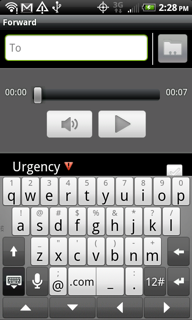
| 3. | Enter
the phone number, email address or select a contact  from your contact book.
 |
| 4. | When you have
finished entering the forwarding phone number or email address, tap  to hide the keyboard. to hide the keyboard. |
| 5. | If
you would like to mark you message as Urgent  or Private or Private
 select the check box select the check box  for that option.
 |
| 6. | Tap Send to send your message or Discard to discard your message. |
Note: Messages marked as Private cannot be forwarded.