Receiving Sprint Visual Voicemail
When you receive a new Sprint Visual Voicemail message, you are notified in one of several ways, depending on your notification settings.
● The Voicemail icon on your home screen displays the number of new messages currently in the Inbox. A new message is a message that has not been read.

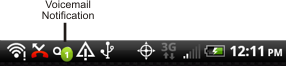
● A notification in the Status Bar will show the number of new (unread) messages.
● If configured in your notification settings, a selected Ringtone will notify you of voicemail messages being downloaded.
● Your
phone will also vibrate if configured to
do so in your notification settings.
Note: If a new message is received while viewing your Sprint Visual Voicemail Inbox, a popup message will be displayed. You can choose to Listen now or Listen later.