Searching Sprint Visual Voicemail
Searching your Sprint Visual Voicemail messages is easy, just follow these steps:
| 1. | Tap the Voicemail icon on the Home Screen. |

— or —
Press  and tap
  >
Voicemail. The application will launch and the Sprint Visual Voicemail Inbox will be displayed.
>
Voicemail. The application will launch and the Sprint Visual Voicemail Inbox will be displayed.
| 2. | To
search for messages,
press
 , then tap , then tap  . . |
| 3. | Type the search text in the search field. As you type, items that are found will be displayed in a drop-down window. To listen to one of the messages listed in the drop-down list, just tap on that message. |
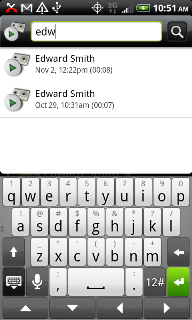
| 4. | Alternatively, you can tap  in the screen shown above and any entries found will be displayed on your screen as shown below. in the screen shown above and any entries found will be displayed on your screen as shown below. |

| 5. | To listen to a message, just tap on the message. |