Content Store
In the content Store you can buy avatars, backgrounds and other Visual Voicemail upgrades.
You must have Avatars enabled to view the Store. See Avatar Settings.
To view the Store
1. From the Visual Voicemail Inbox, tap the Inbox heading and select Store in the list.
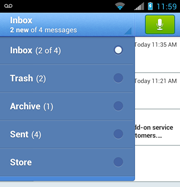
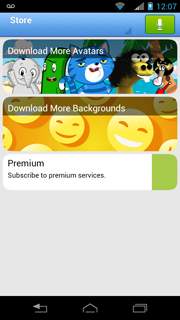
In the Store you can:
● Download additional free avatars and backgrounds
● Buy avatars and backgrounds
● Subscribe to the monthly Premium service
Buy avatars and backgrounds
1. In the Store, tap Download More Avatars or Download More Backgrounds to open the respective catalog.
Avatars and backgrounds that you have already downloaded will be marked with the word "Installed."
2. Select an avatar or background to view details and the option to purchase the item.
3. View the details and tap the price to continue. Or tap Back to return to the previous screen.
4. Tap Buy or tap back to return to the Store.
5. The Google Play store confirmation message will appear. Tap Buy to buy the item or tap Cancel to cancel the purchase. After you confirm, your new content will be downloaded.
Subscribe to the monthly Premium service
Learn about the Premium Service features.
1. In the Store, tap Premium to view subscription details and the option to purchase.
2. Tap Buy to subscribe or tap back to return to the Store.
3. Select the transcription language and tap OK. The options are "English only" or "English/Spanish."
Note: Depending on the terms of your mobile plan, you may not be authorized to make automatic purchases. Visual Voicemail provides you the opportunity to make secure purchases directly to your credit card.
4. If you are prompted to pay by credit card, refer to steps 5 to 9 in Manage Premium Subscription Service.
5. Please wait while the server verifies and updates your account. A confirmation message will appear when the process is complete.